

SCIM
SCIM (System for Cross-domain Identity Management) allows you to automate user provisioning, deprovisioning, and license assignment in LocalStack through your identity provider (IdP). LocalStack’s SCIM implementation follows the SCIM v2.0 specification and has been developed and tested with both the Okta and Microsoft Entra ID SCIM clients.
SCIM is a sub-feature of SSO and requires an active SSO configuration with at least one Identity Provider already set up. See the Single Sign-On documentation before proceeding.
All integration details — including the SCIM Base Connector URL, Bearer Auth Token, and group names per subscription — are available in the LocalStack web app under Settings → Single Sign-On.
For IdP-specific setup instructions, see:
Prerequisites
Section titled “Prerequisites”- An active Enterprise subscription with the SCIM feature enabled
- A configured SSO Identity Provider (OIDC or SAML)
- Admin access to your organization in the LocalStack web app
Enabling SCIM
Section titled “Enabling SCIM”In the LocalStack web app, navigate to Settings → Single Sign-On. For each configured Identity Provider, you will see a SCIM User Provisioning toggle. Enable it for the IdP you want to use for SCIM provisioning.
Once enabled, click View SCIM Configuration to access the SCIM Base Connector URL and Bearer Auth Token needed to configure your IdP.
Setup and Configuration
Section titled “Setup and Configuration”The settings contain the SCIM API Base Connector URL and the Bearer Auth Token as shown in the image below. You can copy these values to configure your SCIM client.
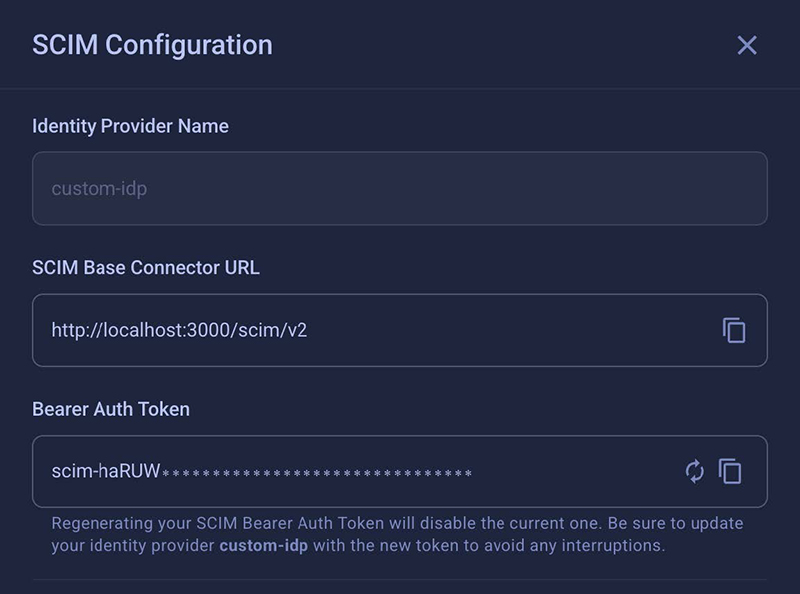
SCIM clients authenticate using a long-lived bearer token. The token starts with scim- and is displayed (masked) in the SCIM configuration panel. Use the copy icon to copy it to your clipboard.
You can regenerate the token at any time using the refresh icon. Regenerating the token immediately invalidates the previous one — update your IdP configuration with the new token to avoid interruptions.
Once you have the Base Connector URL and Bearer Token, continue with the IdP-specific setup:
Web App Roles and Permissions
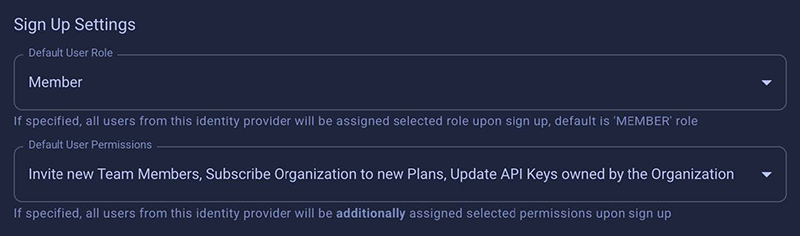
Section titled “Web App Roles and Permissions”LocalStack supports configuring default roles and permissions that are applied when a user is provisioned via SCIM. These can for example be used to grant users access CI credentials or to make them workspace admins.
Granting users permissions or assigning them to groups (e.g. ‘Member’, ‘Admin’) is not supported via SCIM but the settings in the LocalStack web app allow you to set presets that are applied when a user is provisioned via SCIM. These settings are inherited from the SSO settings.
Limitations
Section titled “Limitations”- One license group per user: Each user can be assigned to only one license group (subscription) per organization.
- One SCIM provider at a time: Only one Identity Provider can have SCIM enabled at a time.
- Provisioning is one-way: SCIM sync goes from your IdP to LocalStack only. There is no synchronization from LocalStack back to your IdP.
- LocalStack UI does not block manual edits: The LocalStack web app does not prevent you from manually editing SCIM-provisioned users or their license assignments. It is strongly recommended to manage SCIM-provisioned users exclusively through your IdP to avoid inconsistencies.
- Re-provisioning removed users requires re-invitation: If a user was provisioned via SCIM and later removed, they cannot be re-provisioned via SCIM directly. They must be re-invited through the LocalStack Users & Licenses page and accept the invitation before being reassigned.
API Reference
Section titled “API Reference”LocalStack’s SCIM API is available at /scim/v2 and implements the SCIM v2.0 specification (RFC 7644).
User Endpoints (/scim/v2/Users)
Section titled “User Endpoints (/scim/v2/Users)”| Method | Endpoint | Description |
|---|---|---|
POST | /scim/v2/Users | Create a SCIM user, or idempotently return an existing member when the email matches. Enforces global email uniqueness and userName uniqueness per org and IdP. |
GET | /scim/v2/Users | List active SCIM-provisioned users. Supports filter=userName eq "...", startIndex, and count for pagination. |
GET | /scim/v2/Users/{id} | Retrieve a SCIM user only if they are SCIM-provisioned and active in the org; returns 404 otherwise. |
PATCH | /scim/v2/Users/{id} | RFC 7644 PatchOp for selected fields (name, emails) and deactivation via active:false. Reactivation via SCIM is not supported. Patching userName or externalId is not supported. |
PUT | /scim/v2/Users/{id} | Full replace of mutable fields (name, email) with support for deactivation via active:false. Reactivation via SCIM is ignored. |
Group Endpoints (/scim/v2/Groups)
Section titled “Group Endpoints (/scim/v2/Groups)”| Method | Endpoint | Description |
|---|---|---|
POST | /scim/v2/Groups | Bind an existing subscription as a SCIM group via displayName (format: {PLAN}-{EMULATOR}-{subscription_id}). Optionally assign members. Validates membership and enforces one-group-per-user per org. Returns 201 on success; 409 for insufficient seats or conflicts. |
GET | /scim/v2/Groups | List groups (subscriptions) with their SCIM members. Supports filter=displayName eq "...", startIndex, and count (max 1000). |
GET | /scim/v2/Groups/{id} | Retrieve a group by its subscription ID with SCIM members. Returns 404 if not found. |
PATCH | /scim/v2/Groups/{id} | RFC 7644 PatchOp (add, remove, replace) for members. Supports capacity checks and rollback on partial failures. |
PUT | /scim/v2/Groups/{id} | Full replace of group membership. Omitting or passing an empty members array clears all members. Supports rollback on errors. |
DELETE | /scim/v2/Groups/{id} | Delete the group binding and unassign SCIM members. Non-SCIM assignments are unaffected. Returns 204 on success. |
Metadata Endpoints
Section titled “Metadata Endpoints”| Method | Endpoint | Description |
|---|---|---|
GET | /scim/v2/ResourceTypes | List all supported SCIM resource types (User, Group). |
GET | /scim/v2/Schemas | List supported SCIM schemas for user and group resources. |
GET | /scim/v2/ServiceProviderConfig | Return service provider configuration and supported capabilities. |